Advert · Traffic & ads

Radio traffic that schedules itself

Commercials, promos, PSAs and political ads in one system. Placement follows your priorities and rules, and finished breaks reach your playout system on their own.

Automatic ad placement on a weekly grid, with a broadcast tower

Sound familiar?

  • “Friday night, and you’re still in next week’s ad spreadsheet.
  • “Two banks ran back to back – and the client heard it.
  • “The advertiser wants proof, and you’re combing the log line by line.

01

The log: a whole week on one screen

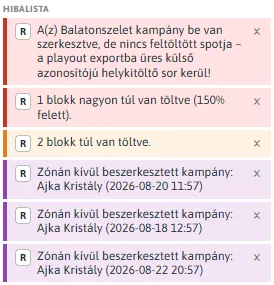
Campaigns and their fill on the left, the weekly grid in the middle, actions and the issue list on the right. Place by hand, or let Autopilot do it in one click.

  • Break fill as a percentage, at a glance
  • Drag-and-drop running order within a break
  • Copy last week, roll forward to next week
The weekly ad log grid with fill indicators

02

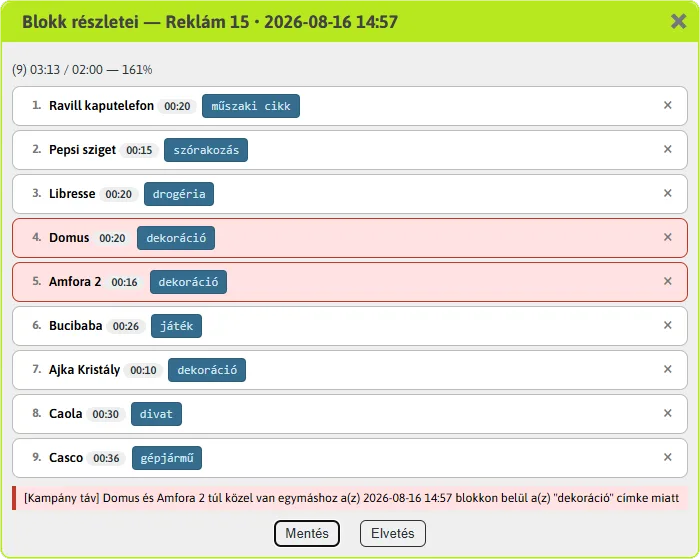
Rules that watch for you

Competitor separation, repeat distance and per-break count limits. One rule covers a whole tag type, so you don’t set it up advertiser by advertiser.

  • Strict (red) and soft (yellow) levels
  • Conflicts shown instantly on the grid and issue list
  • The final call is always yours
The weekly ad log grid with fill indicators

03

Dayparts: all 168 hours of the week, one click each

Prime time, weekends, mornings only – paint a daypart on a weekly grid with your mouse. Set each campaign’s weekly targets per daypart.

Example: weekday mornings and afternoons, weekend late mornings · 1-5:6-9,15-18;6-7:9-12

04

Spot schedules and proof, from what really aired

A campaign’s complete airing list: the past from the actual as-run log, the future from the log plan, in one chronological document. Export to TXT or PDF.

A campaign's spot schedule, day by day

How it works

From campaign to air

  1. 1Add a campaign with audio and flight dates
  2. 2Set dayparts and weekly targets
  3. 3Schedule by hand or with Autopilot
  4. 4Check against the rules, then save
  5. 5Audio and breaks go to playout automatically
  6. 6Spot schedule and proof of performance for the client

Less spreadsheet, more time for clients

Autopilot does the mechanical part of the weekly log, and the rules watch for conflicts. Your team keeps its time for what brings in revenue: the advertisers.

Every ad type in one place

  • Commercial
  • Public service announcement
  • Community notice
  • Political ad
  • Promo

Frequently asked questions

Can Autopilot overwrite my manual scheduling?

No. Autopilot only places campaigns that haven’t met their targets, and only runs on weeks that haven’t started yet.

What happens when a rule is broken?

It is flagged instantly on the grid and in the issue list, and you are asked to confirm on save. Rules guide; you decide.

How do ads get on air?

When you save a campaign, its audio is uploaded to the playout system automatically, and finished breaks are handed over on their own. Nothing else to do.

  • Core

    Report Reporting

    Regulatory and royalty reports, affidavits and statistics from your own as-run log.

  • Core

    Track Monitoring

    Watches streams, sound cards, servers and storage, with Telegram alerts.

An illuminated on-air lamp on the studio wall

Contact

Let’s listen to your station together.

Show us how you work today. We’ll show you how much time you can move from routine chores to content and quality.